
CAN bus tools · MasterCAN family
CEEAC

MasterCAN

Six purpose-built tools for working with vehicle CAN buses — display readings in the cab, convert protocols, mix analog and digital sensors, bridge BLE to CAN, integrate NMEA 2000, or simulate and analyze a bus during development. The infrastructure layer between your sensors and your telematics platform.

Protocols
CAN J1939 · J1708 · NMEA 2000 · Modbus · RS-485 · BLE
All major bus standards
Form factors
Display · converter · analyzer · I/O · bridge
Six SKUs in the family
Operating range
−40 to +85°C
Truck-grade across all variants
Buyer
Operators · integrators · OEMs · developers
Family covers all four

From €85 / unit (S7 Radiobox) · single units on Technoton e-shop · in stock 5–10 days
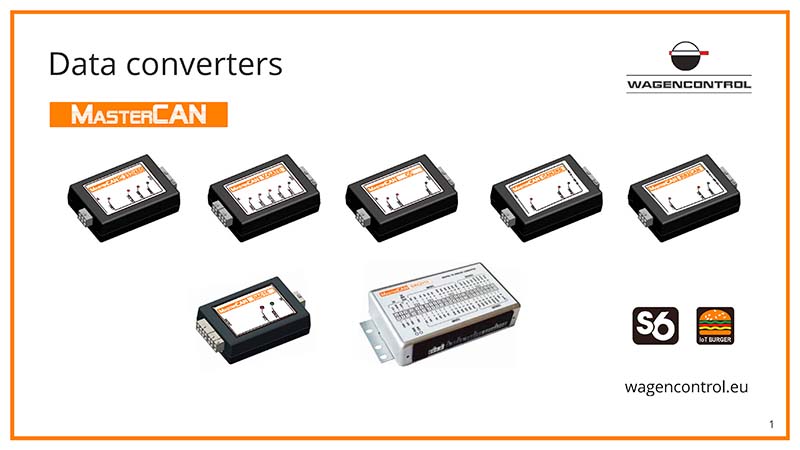
MasterCAN family — CAN bus tools
MasterCAN family · six tools for vehicle CAN bus
What it does
Display · convert · filter · integrate · analyze CAN bus data
Compatible buses
CAN J1939/71 · J1708 · NMEA 2000 · ISObus · Modbus · RS-485 · BLE
Operating range
−40 to +85°C · IP-rated per variant
Typical install
30 min – 2 hours per device
How it works

The middle layer between your sensors and your platform.

Every fleet telemetry stack has the same problem in the middle: too many sensors, too many bus types, too few inputs on the gateway. MasterCAN tools sit between sensors and gateway — collecting analog and digital signals, filtering CAN messages down to what matters, converting between bus standards, displaying readings in the cab, or bridging wireless sensors back to the wired bus.

  1. Collect— DAC15 mixes analog sensors (DUT-E, GNOM analog) with digital CAN data into one consolidated bus output.
  2. Filter— MasterCAN classic and FMSCrocodile reduce noisy CAN traffic to the parameters your gateway actually consumes.
  3. Convert— S7 NMEA bridges wireless DFM/DUT sensors to vessel NMEA 2000; Radiobox CAN bridges BLE sensors to J1939.
  4. Surface— MasterCAN Display 35 shows the cab operator key parameters live; MasterCAN Tool helps developers debug new integrations.
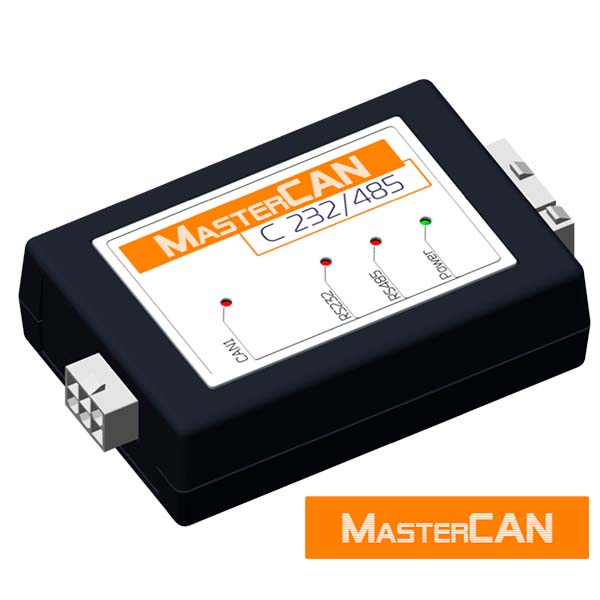
MasterCAN family — CAN bus tools for vehicle telematics

MasterCAN tools: the infrastructure layer between sensors and telematics gateway

Pick your tool

Six tools. Pick the one your stack needs.

Each MasterCAN tool does one job well. Use the filter to narrow by use case, or scan all six.
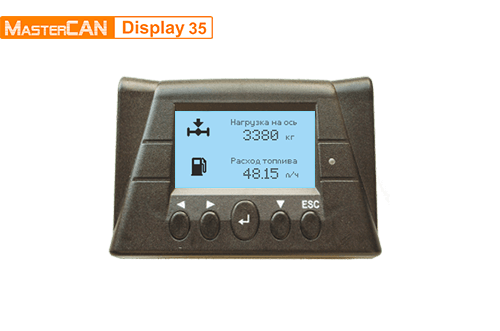
MasterCAN Display 35
Display in cab · most-used

MasterCAN Display 35

CAN J1939 · ISObus · Analog

In-cab display of any CAN parameter — plus inputs from analog and J1939 sensors

Specs: 3.5" display · CAN J1939 / ISObus inputs · analog + digital sensor inputs · IP54
Best for: Operators who need real-time machine status visible from the cab
MasterCAN converter
Convert / filter CAN

MasterCAN converter

CAN J1939 · Modbus · RS-232/485 · Analog

The middle layer: filter CAN messages, convert to Modbus / RS-485 / analog for any gateway

Specs: CAN J1939/71 input · Modbus RS-232/485 output · analog output · 25+ filtered parameters
Best for: Stacks where the gateway needs filtered data, not raw CAN traffic
MasterCAN DAC15
Analog + digital I/O

MasterCAN DAC15

CAN J1939/S6 · Analog 0–10V · Discrete I/O

Mix analog sensors and digital CAN devices on one fleet platform
Specs: 15 analog/digital inputs · CAN/S6 output · works with DUT-E analog + DFM digital
Best for: Mixed-equipment fleets where some sensors are analog, others are CAN
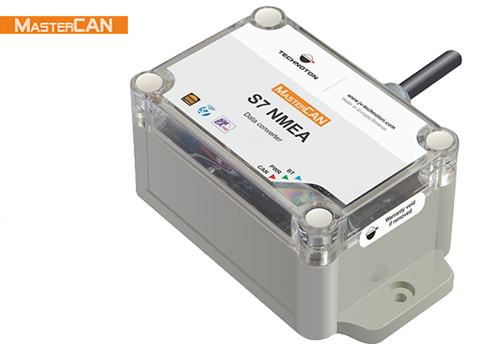
S7 NMEA converter
NMEA 2000 · marine

S7 NMEA converter

BLE · NMEA 2000

Bridge wireless DFM / DUT-E S7 sensors to vessel NMEA 2000 bus

Specs: Multiple BLE sensors → one NMEA 2000 output · vessel-grade enclosure · used with DFM Marine S7
Best for: Vessels with NMEA-based onboard systems and S7 wireless sensors
MasterCAN Tool
Developer / OEM · analyzer

MasterCAN Tool

CAN J1939 · Read / write / log

CAN J1939 simulator-analyzer for developers building CAN-integrated products

Specs: Read · send · log · analyze CAN traffic · scripting support · software included
Best for: OEMs, integrators, QA engineers building or testing CAN-integrated equipment
S7 Radiobox CAN
BLE wireless bridge

S7 Radiobox CAN

BLE · CAN J1939/71

Bridge multiple wireless BLE sensors back to wired CAN J1939

Specs: Up to 16 BLE devices · CAN J1939/71 output · enables wireless retrofits on wired gateways
Best for: Retrofit installs where wireless sensors are easier but the gateway is wired-only
Specifications

Full comparison across all six variants.

Display 35ConverterDAC15S7 NMEAToolS7 Radiobox
FunctionIn-cab displayFilter / convert CAN → ModbusMix analog + CANBLE → NMEA 2000Analyzer / simulatorBLE → CAN J1939
InputsCAN J1939 · ISObus · analogCAN J1939/7115 analog/digitalMultiple BLECAN J1939Up to 16 BLE
OutputsDisplay onlyModbus · RS-232/485 · analogCAN/S6NMEA 2000(read/write/log)CAN J1939/71
Display3.5" LCDVia PC software
Power supply9–45 V9–45 V9–45 V9–45 VUSB / 9–45 V9–45 V
IP ratingIP54IP54IP54IP66IP40IP54
Best forOperator visibilityStandard gateway feedMixed sensor typesVessel NMEA stacksDevelopers / OEMsWireless retrofits
Price (10+ units)€340€280€240€195Quote only€85
Compatibility

Feeds any gateway that supports CAN, Modbus, RS-485, analog, or NMEA 2000.

Certified telematics platforms

WialonNavixyGeotabWebfleetSamsaraMiX TelematicsFleetCompleteGurtamFleetCustom OEM platforms

Protocols

CAN J1939/21CAN J1939/71 (FMS)ISObus (ISO 11992-2)ModbusRS-232 / RS-485NMEA 2000Analog 0–10VBLE

Companion products

MasterCAN tools pair with Wagencontrol sensors as inputs: DUT-E · DFM · GNOM · CAN Crocodile · CAN Crocodile S7 · DFM S7. Outputs go to any GPS / telematics gateway or directly to NMEA 2000 onboard systems.

Multi-vehicle fleet or OEM integration? Talk to our engineering team.

A Wagencontrol engineer reviews your stack (gateway, sensors, target outputs), recommends the right MasterCAN mix, and quotes per variant — usually within 4h on EU business hours.